Tye Robinson
UX Case Study Mobile workflow Field service

Verizon Self-to-Pro
Installer App

I redesigned key installer screens to reduce context switching, clarify job status, and make on-site validation (like 5G signal quality) fast and explainable to customers.

Role UX Lead
Scope Core installer flow
Methods Workflow mapping, testing
Tools Sketch, Miro, InVision
Verizon Self-to-Pro installer app hero

My UX focus

  • Make “what’s next” obvious during installs.
  • Give support + customers a shared, trustworthy status.
  • Turn technical signal metrics into a simple pass/fail story.

The story

Self-to-Pro installs involve three perspectives: the customer, the service team, and the field installer. The gap wasn’t effort, it was coordination and clarity at the moments that matter.

Problem

Installers bounced between tools and screens to complete steps, confirm setup, and validate signal. Meanwhile, support and customers didn’t share the same understanding of status, which led to uncertainty, delays, and rework.

Goal

  • Create one guided path for installers with fewer handoffs.
  • Make job status scannable and consistent across teams.
  • Help installers prove the install is “good” in a customer-friendly way.

What I owned

  • Mapped the end-to-end workflow and handoffs.
  • Designed key mobile screens (job list, guided steps, 5G validation).
  • Partnered with research + stakeholders to prioritize fixes.
  • Supported iteration through build and review.

Research and understanding

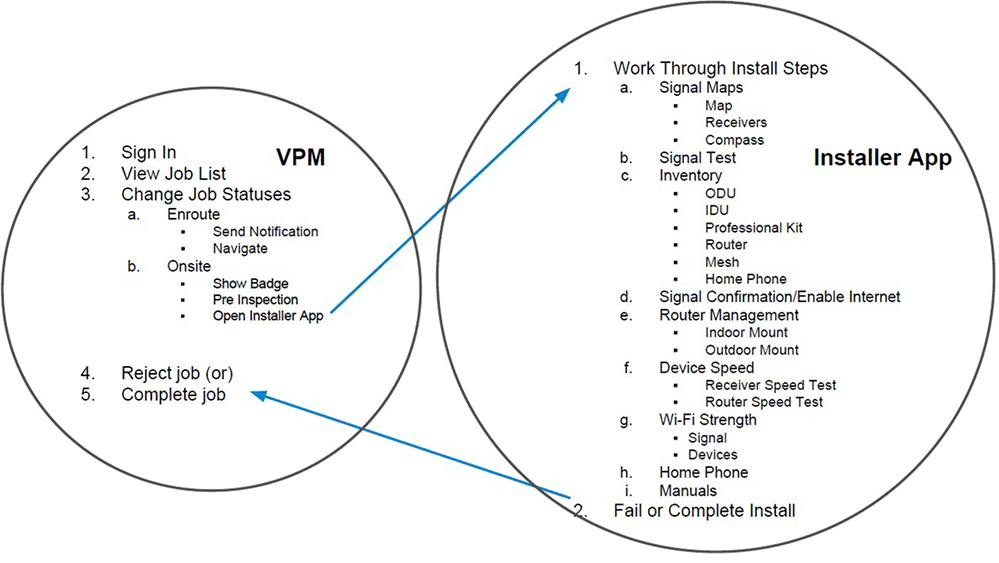
I started by making the workflow visible: where decisions happen, where information breaks, and what installers actually do under time pressure.

Process map showing key handoffs across apps

Process mapping to identify handoffs, failure points, and opportunities for a guided path.

Key insights

  • Status drift caused support and customers to operate on stale or conflicting info.
  • Context switching during installs increased missed steps and slowed troubleshooting.
  • Signal validation needed to be explainable, not just technically accurate.
  • Edge cases (connectivity, customer unavailable, equipment issues) needed clear paths, not workarounds.

Design principles

  • One path: keep installers in a single guided flow.
  • Scan first: make lists and statuses readable in seconds.
  • Prove it: convert metrics into trust signals customers understand.
  • Handle reality: design for the messy cases, not the happy path.

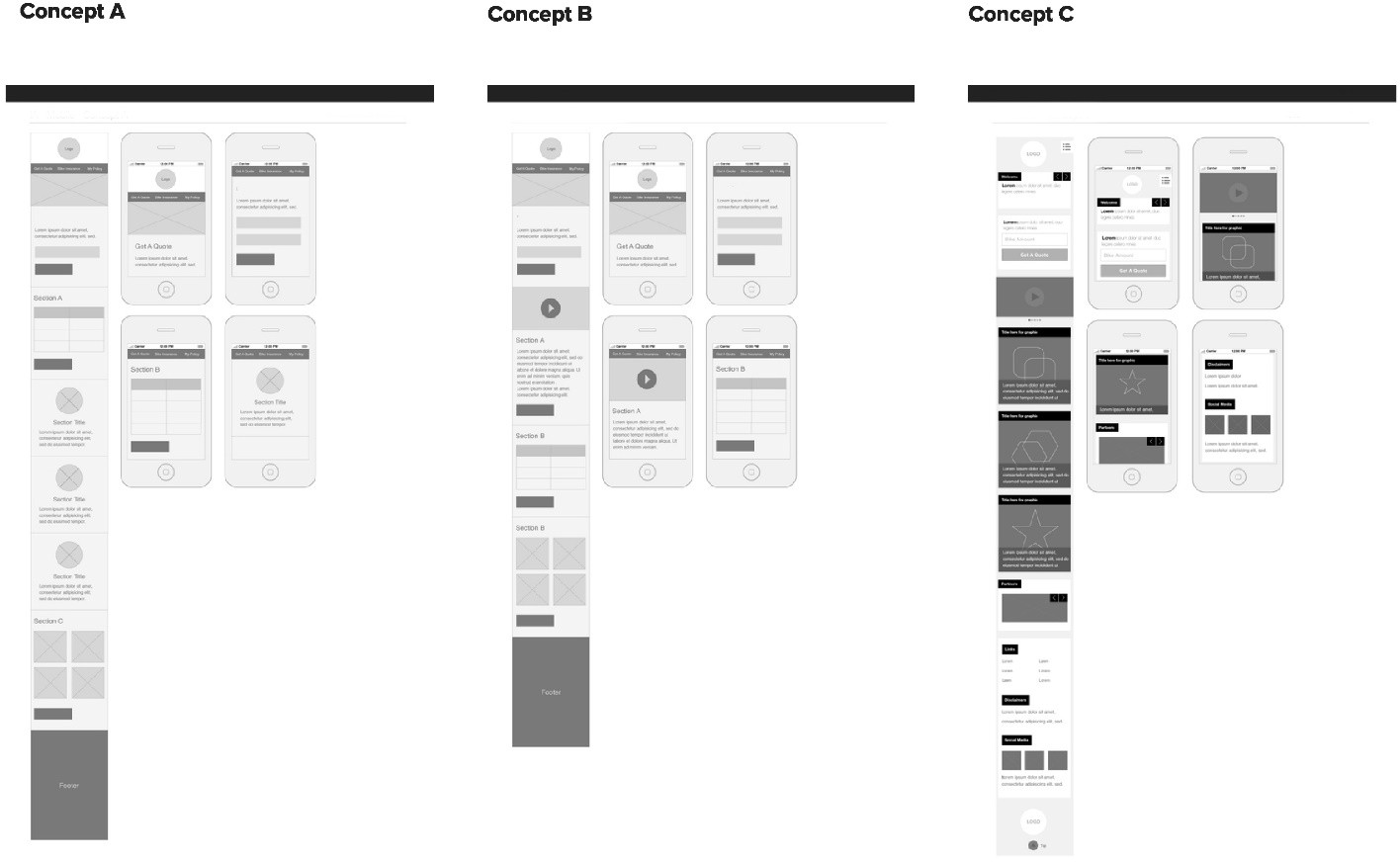
Concept exploration

I explored how status, guided steps, and validation could work together as one installer experience, while staying aligned with upstream job lifecycle systems.

Wireframe concepts for installer workflow across roles

What we learned

First-time install success depends on clean handoffs, readiness, and a consistent “definition of done” at each checkpoint.

Key frictions

  • Status drift between teams.
  • Missing context at the doorstep.
  • Poor connectivity in garages and basements.
  • Duplicate data entry across systems.

Design direction

A guided installer flow that improves visibility for service teams and customers through consistent statuses and clear checkpoints.

Usability testing and prioritization

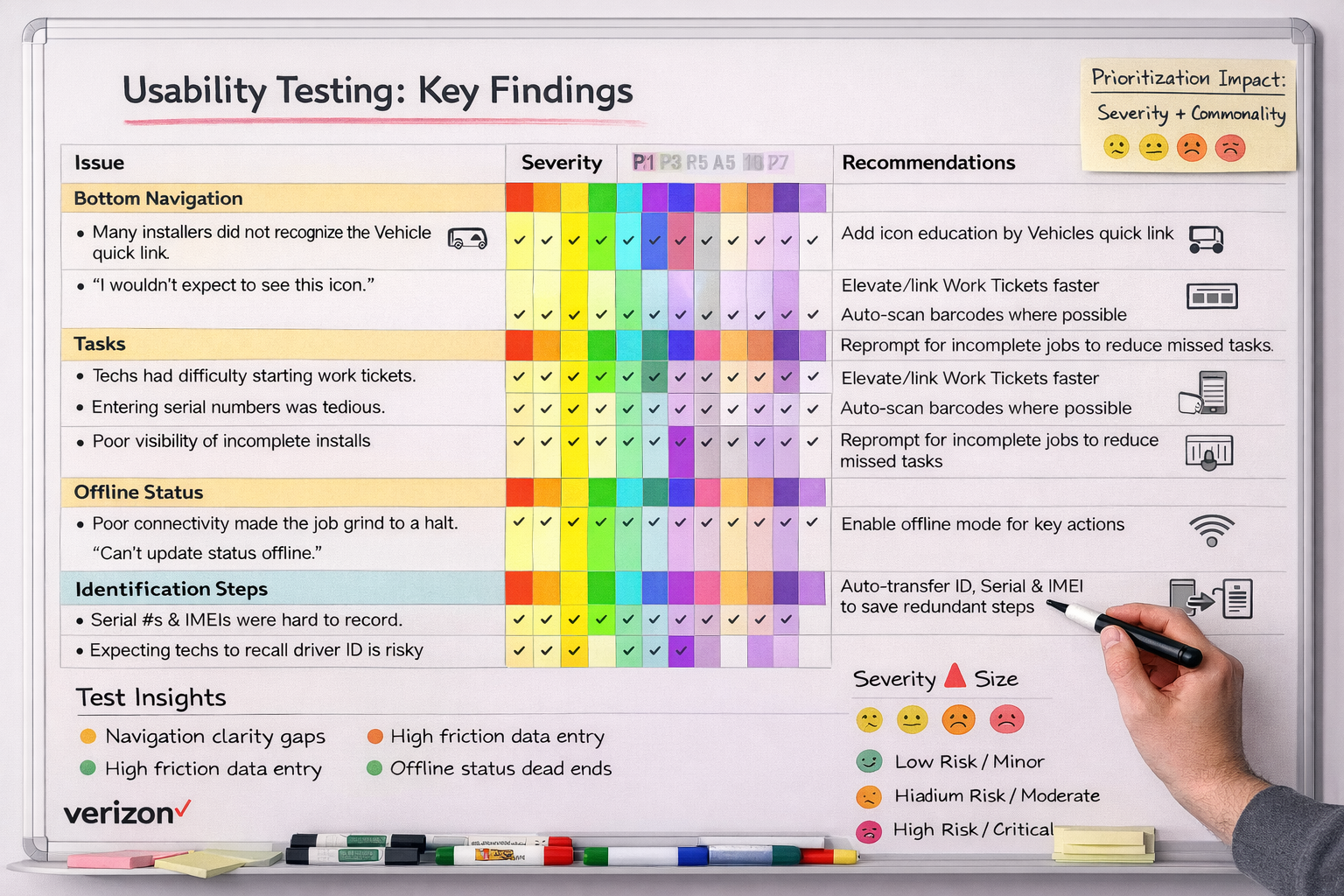
We tested early flows with technicians and used issue mapping to prioritize what to fix first. The goal was to remove ambiguity where speed and confidence matter most.

Issue mapping highlights

We mapped frequency and severity to focus iteration on the highest-impact breakdowns.

High frequency
Navigation clarity

Technicians struggled to find the “next step” quickly.

High severity
Action labeling + ambiguity

Under time pressure, unclear actions caused wrong turns and retries.

Trust gap
Signal interpretation

Raw numbers didn’t answer “Is this safe / acceptable?” for customers.

Issue mapping artifact

What changed

  • Reduced ambiguous icons and added clearer labels.
  • Made the “primary action” visually dominant per screen.
  • Defined clearer status language to prevent drift.

Risk handled

  • Designed for low-connectivity environments.
  • Added explicit paths for common edge cases.
  • Improved confidence during validation moments.

Speed improved

  • Fewer taps to find “next step.”
  • Less re-reading and guessing.
  • Cleaner handoff between job list → install workflow.

Key screens

Here are three moments I focused on: triage your day, stay in a guided path, and validate signal in a way customers trust.

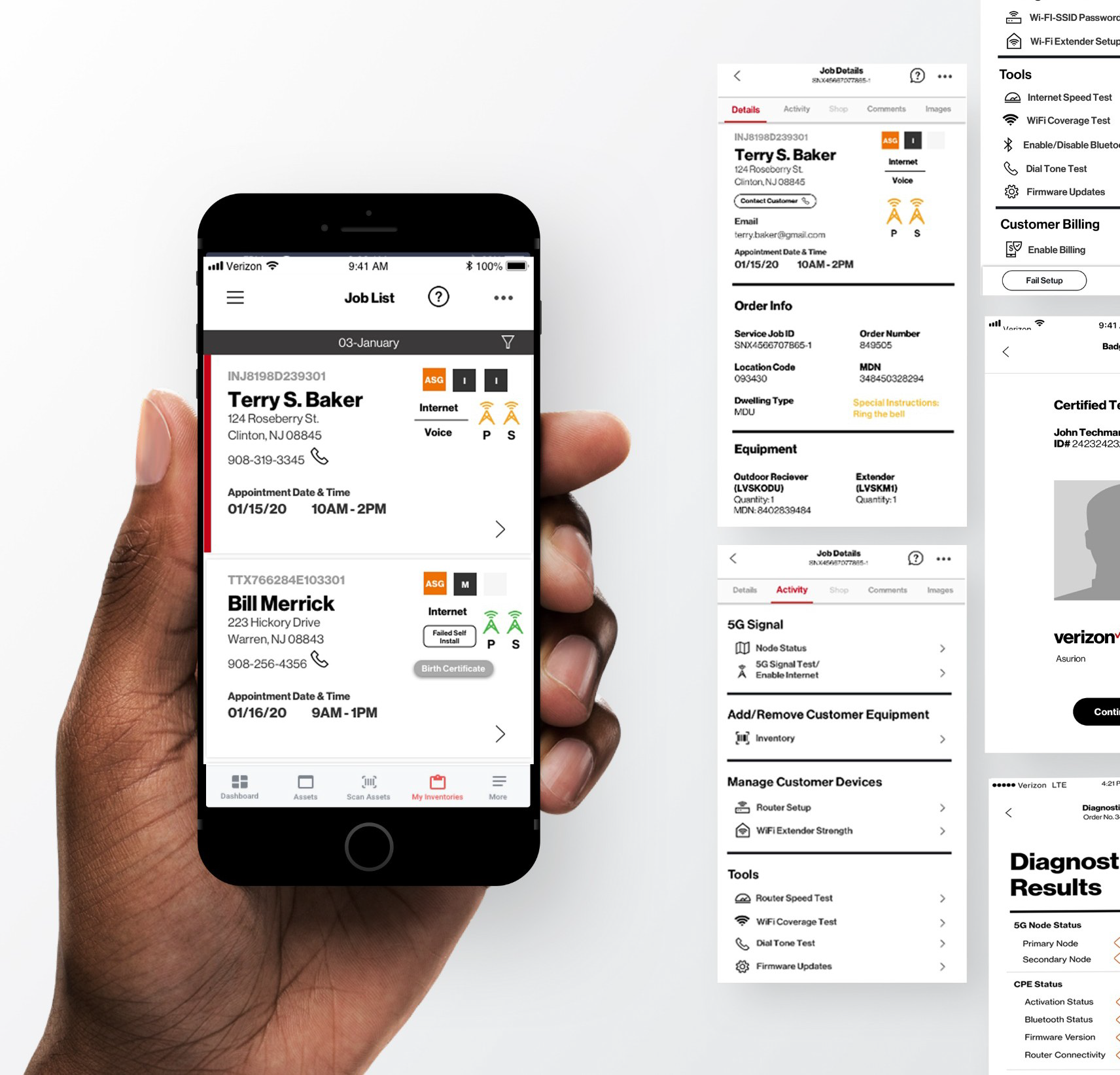
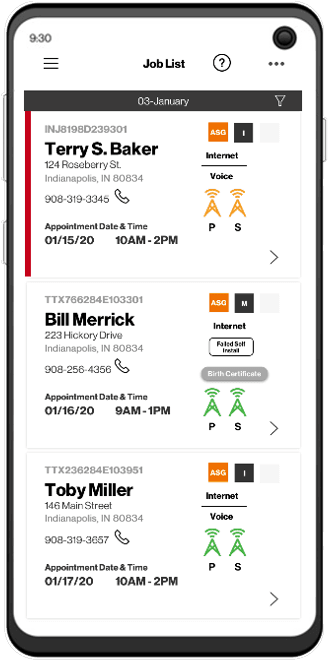
Job list screen

Job List: fast triage

A scannable list that helps installers prioritize appointments and spot risk before arriving.

  • Situation: Installers needed to quickly understand what’s next and what might go wrong.
  • Task: Make jobs scannable with the essentials and an early signal/coverage cue.
  • Action: Designed job cards with identity, address, time window, tap-to-call, and service indicators.
  • Result: Faster decisions, fewer surprises, smoother entry into the install flow.
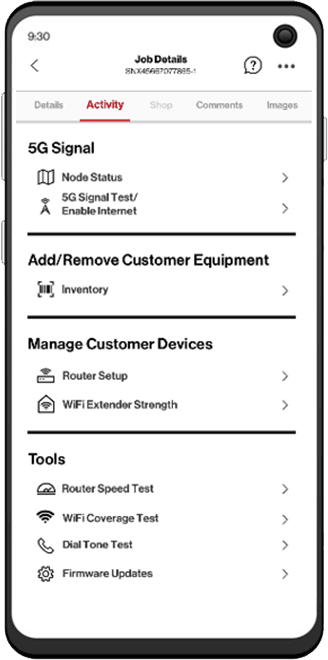
Guided steps activity screen

Activity: one guided path

A single “what’s next” path that reduces jumping between tools and screens during installs.

  • Situation: Install steps were fragmented, increasing context switching and missed steps.
  • Task: Keep installers moving forward with clear checkpoints.
  • Action: Organized steps into a sequence with clear progress and a single primary CTA per moment.
  • Result: More consistent installs and fewer avoidable repeats.
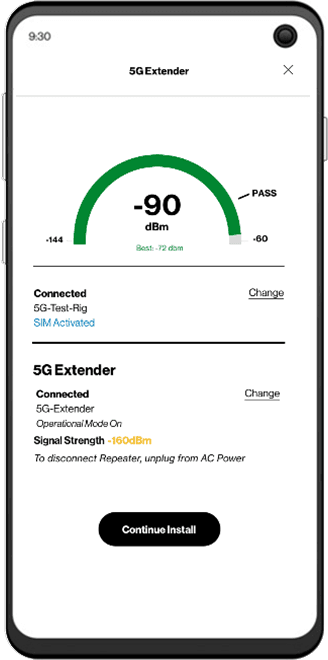
5G signal validation screen

5G validation: make it trustworthy

Translate technical metrics into a customer-friendly stoplight status, so installers can prove the install is safe and within range.

  • Situation: Raw numbers didn’t answer “is this good/safe?” for customers.
  • Task: Provide a clear pass/fail and an explainable signal indicator.
  • Action: Stoplight status + current/best readings + context to reduce troubleshooting.
  • Result: Faster validation and higher customer confidence on-site.

Outcomes

This work helped shift the experience from “figure it out” to “follow the path,” with clearer status alignment and faster validation moments. Replace the cards below with your real metrics if you have them.

Clearer

Installer workflow

Reduced ambiguity at key steps by defining primary actions and checkpoints.

Faster

On-site validation

Made signal quality easier to interpret and explain without technical translation.

Aligned

Shared status

Designed status cues that support consistent understanding across teams.

What I’d do next

  • Instrument the flow to track step completion time and drop-off by checkpoint.
  • Validate the stoplight thresholds with real-world install outcomes and support tickets.
  • Expand edge-case handling (offline mode, equipment swaps) to reduce workarounds.
Prototype

Installer Field Service App Prototype

A guided, end-to-end mobile flow from arrival to closeout. Built to reduce missed steps, improve consistency, and help installers complete installs confidently.

View Prototype
Service blueprint

Want the full walkthrough?

I can share additional screens, flows, and decision points (including what changed after testing).

Email me